

Single sign-on (SSO)
With single sign-on, people use their account in your app. Nobody makes a FeedbackOtter account or password.
Only your real customers can vote, comment and post ideas. And you see who asked for what: their name, email, plan and revenue.
It works in two places:
- The widget inside your app.
- Your board, the public site for your ideas, roadmap and changelog.
How it works
Section titled “How it works”- Your server signs a short token for the logged-in user, with your secret.
- You give the token to the widget, or send the user to your board with it.
- FeedbackOtter checks the signature and signs them in.
The token is a standard JWT signed with HS256. Any JWT library can make one.
1. Get your secret
Section titled “1. Get your secret”In the dashboard, go to Settings → Single sign-on. Click Reveal, then copy the secret.
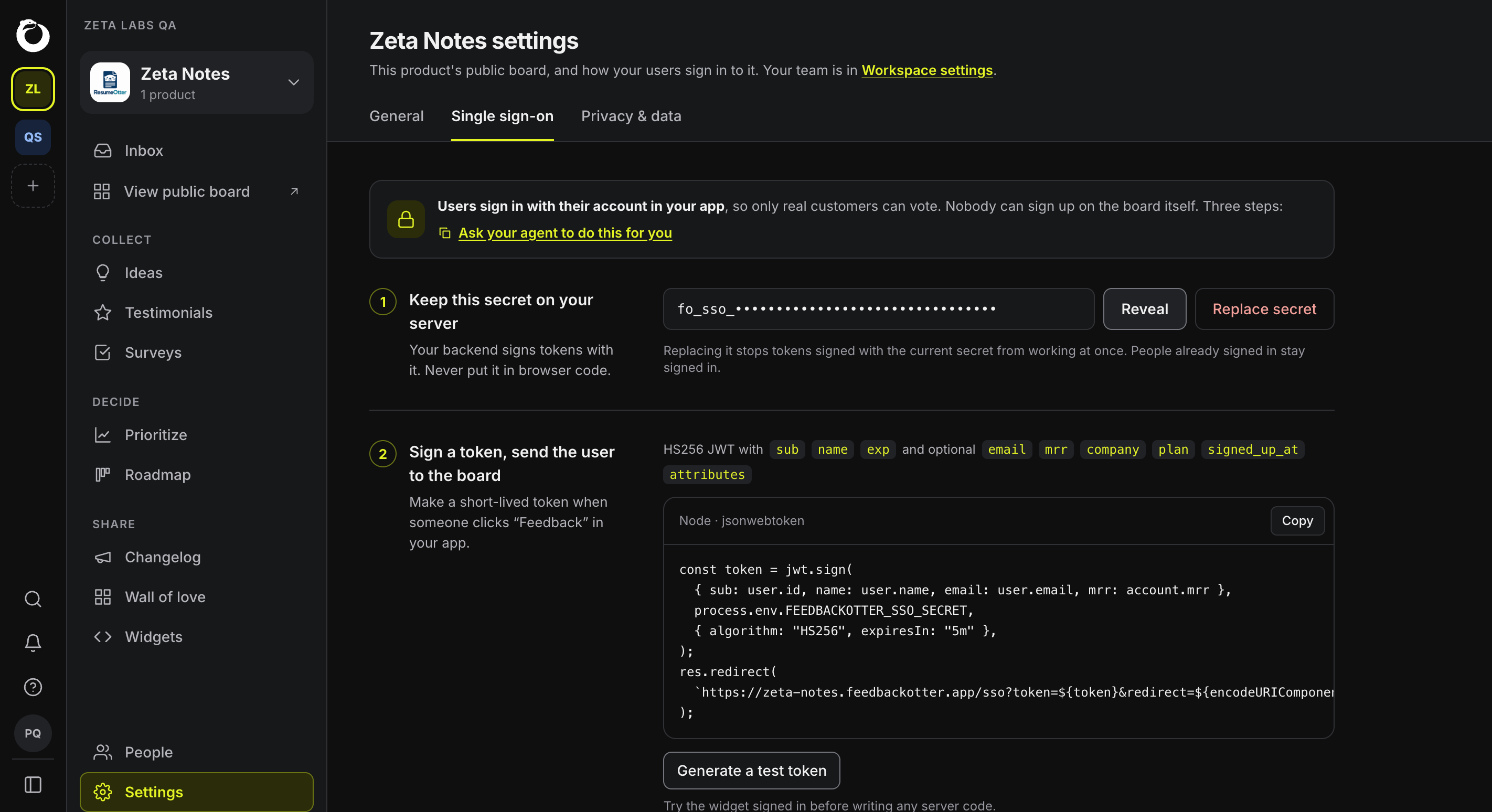
Store it on your server as an environment variable.
The examples below use FEEDBACKOTTER_SSO_SECRET.
Each product has its own secret.
2. Build the token
Section titled “2. Build the token”A token holds a few facts about the user, called claims.
| Claim | Required | What it is |
|---|---|---|
sub |
Yes | Your user’s ID, as a string. Up to 200 characters. Never changes. |
name |
Yes | Their name. Up to 100 characters. |
exp |
Yes | When the token expires, in seconds since 1970. At most 24 hours ahead. |
email |
No | Their email address. Used for notifications. |
mrr |
No | Their monthly revenue, in US dollars. A number, like 249.5. |
company |
No | Their company’s name. Up to 100 characters. |
plan |
No | Their plan, like "Business". Up to 60 characters. |
signed_up_at |
No | When they joined your app, in seconds since 1970. |
attributes |
No | Up to 20 of your own fields. See Custom attributes. |
A token with every claim:
{ "sub": "123", "name": "Ada Lopez", "email": "ada@example.com", "mrr": 249.5, "company": "Acme Inc", "plan": "Business", "signed_up_at": 1767225600, "attributes": { "role": "admin", "seats": 12, "beta": true }, "exp": 1795174696}- Sign with HS256. Other algorithms are rejected.
submust be a string:"123", not123.expis in seconds, not milliseconds.- Extra claims, like
iat, are ignored.
Email, revenue, company, plan, sign-up date and attributes are only shown to your team. Use them to pick who sees a survey. On the Business plan and up, you can also sort ideas by the revenue behind them.
Custom attributes
Section titled “Custom attributes”Send your own facts about a user in attributes:
"attributes": { "role": "admin", "seats": 12, "beta": true, "renews_on": "2026-12-01" }- Keys start with a letter. Then letters, numbers and
_. Up to 40 characters. - Values are text (up to 200 characters), numbers, or
true/false. - Dates go in as text, like
"2026-12-01". - Up to 20 attributes. The rest are ignored.
Anything else, like a nested object or null, is skipped.
It doesn’t stop the sign-in.
3. Sign it on your server
Section titled “3. Sign it on your server”Pick your language. Every example signs the same token, and each one was tested against FeedbackOtter.
// npm install jsonwebtokenimport jwt from "jsonwebtoken";
const token = jwt.sign(  { sub: String(user.id), name: user.name, email: user.email },  process.env.FEEDBACKOTTER_SSO_SECRET,  { algorithm: "HS256", expiresIn: "1h" },);
For edge runtimes, Cloudflare Workers, Deno and Bun.
// npm install joseimport { SignJWT } from "jose";
const secret = new TextEncoder().encode(process.env.FEEDBACKOTTER_SSO_SECRET);
const token = await new SignJWT({ name: user.name, email: user.email })  .setProtectedHeader({ alg: "HS256" })  .setSubject(String(user.id))  .setExpirationTime("1h")  .sign(secret);
# pip install PyJWTimport osimport time
import jwt
token = jwt.encode( { "sub": str(user.id), "name": user.name, "email": user.email, "exp": int(time.time()) + 3600, }, os.environ["FEEDBACKOTTER_SSO_SECRET"], algorithm="HS256",)# Gemfile: gem "jwt"require "jwt"
token = JWT.encode( { sub: user.id.to_s, name: user.name, email: user.email, exp: Time.now.to_i + 3600 }, ENV.fetch("FEEDBACKOTTER_SSO_SECRET"), "HS256")<?php// composer require firebase/php-jwtuse Firebase\JWT\JWT;
$token = JWT::encode([ 'sub' => (string) $user->id, 'name' => $user->name, 'email' => $user->email, 'exp' => time() + 3600,], getenv('FEEDBACKOTTER_SSO_SECRET'), 'HS256');// go get github.com/golang-jwt/jwt/v5import ( "os" "strconv" "time"
"github.com/golang-jwt/jwt/v5")
token, err := jwt.NewWithClaims(jwt.SigningMethodHS256, jwt.MapClaims{ "sub": strconv.Itoa(user.ID), "name": user.Name, "email": user.Email, "exp": time.Now().Add(time.Hour).Unix(),}).SignedString([]byte(os.Getenv("FEEDBACKOTTER_SSO_SECRET")))No library needed: an HS256 token is two Base64 parts and an HMAC. Already use a JWT library, like jjwt? Use that instead.
import java.nio.charset.StandardCharsets;import java.time.Instant;import java.util.Base64;import javax.crypto.Mac;import javax.crypto.spec.SecretKeySpec;
public class FeedbackOtterToken {  public static String sign(String sub, String name, String email, String secret) throws Exception {    var b64 = Base64.getUrlEncoder().withoutPadding();    long exp = Instant.now().plusSeconds(3600).getEpochSecond();    String header = "{\"alg\":\"HS256\",\"typ\":\"JWT\"}";    String payload = String.format(        "{\"sub\":%s,\"name\":%s,\"email\":%s,\"exp\":%d}",        json(sub), json(name), json(email), exp);    String unsigned = b64.encodeToString(header.getBytes(StandardCharsets.UTF_8)) + "."        + b64.encodeToString(payload.getBytes(StandardCharsets.UTF_8));    Mac mac = Mac.getInstance("HmacSHA256");    mac.init(new SecretKeySpec(secret.getBytes(StandardCharsets.UTF_8), "HmacSHA256"));    return unsigned + "." + b64.encodeToString(mac.doFinal(unsigned.getBytes(StandardCharsets.UTF_8)));  }
  // A JSON string, escaped. Use your JSON library (Jackson, Gson) if you have one.  static String json(String s) {    var out = new StringBuilder("\"");    for (char c : s.toCharArray()) {      if (c == '"' || c == '\\') out.append('\\').append(c);      else if (c < 0x20) out.append(String.format("\\u%04x", (int) c));      else out.append(c);    }    return out.append('"').toString();  }}
// String token = FeedbackOtterToken.sign(//     String.valueOf(user.getId()), user.getName(), user.getEmail(),//     System.getenv("FEEDBACKOTTER_SSO_SECRET"));
Version 10 and later of jsonwebtoken need a crypto feature: rust_crypto or aws_lc_rs.
// Cargo.toml:// jsonwebtoken = { version = "12", features = ["rust_crypto"] }// serde = { version = "1", features = ["derive"] }use jsonwebtoken::{encode, EncodingKey, Header};use serde::Serialize;use std::time::{SystemTime, UNIX_EPOCH};
#[derive(Serialize)]struct Claims {    sub: String,    name: String,    email: String,    exp: u64,}
fn feedback_otter_token(user: &User) -> Result<String, Box<dyn std::error::Error>> {    let now = SystemTime::now().duration_since(UNIX_EPOCH)?.as_secs();    let claims = Claims {        sub: user.id.to_string(),        name: user.name.clone(),        email: user.email.clone(),        exp: now + 3600,    };    let secret = std::env::var("FEEDBACKOTTER_SSO_SECRET")?;    let key = EncodingKey::from_secret(secret.as_bytes())?;    Ok(encode(&Header::default(), &claims, &key)?)}
Sign a new token for each page view or sign-in. Don’t store tokens or share them between users.
4. Sign users in to the widget
Section titled “4. Sign users in to the widget”Put the token in the embed code as token.
Render it into the page on your server:
<script> // …the rest of your embed code… FeedbackOtter.init({ publicKey: "pk_…", token: "<%= feedback_otter_token %>", // from your server, per page view });</script>Get the embed code from Widgets → Feedback widget. See Install the widget.
Single-page apps
Section titled “Single-page apps”When someone signs in without a page reload, pass a fresh token to identify:
const { token } = await fetch("/api/feedbackotter-token").then((r) => r.json());FeedbackOtter.identify(token);When they sign out, clear it:
FeedbackOtter.identify(null);Your /api/feedbackotter-token route signs a token for the current user, as in step 3.
Long sessions
Section titled “Long sessions”The widget sends the token with every request. When it expires, the widget goes read-only and logs why in the console.
If people keep a tab open for hours, call identify with a new token before the old one expires.
Check it worked
Section titled “Check it worked”init tells you whether the user is signed in:
const { signedIn, reason } = await FeedbackOtter.init({ publicKey: "pk_…", token });// signedIn: true, or false with a reason5. Sign users in to your board
Section titled “5. Sign users in to your board”Your board has a Sign in button. It sends people to a page in your app, called the login URL.
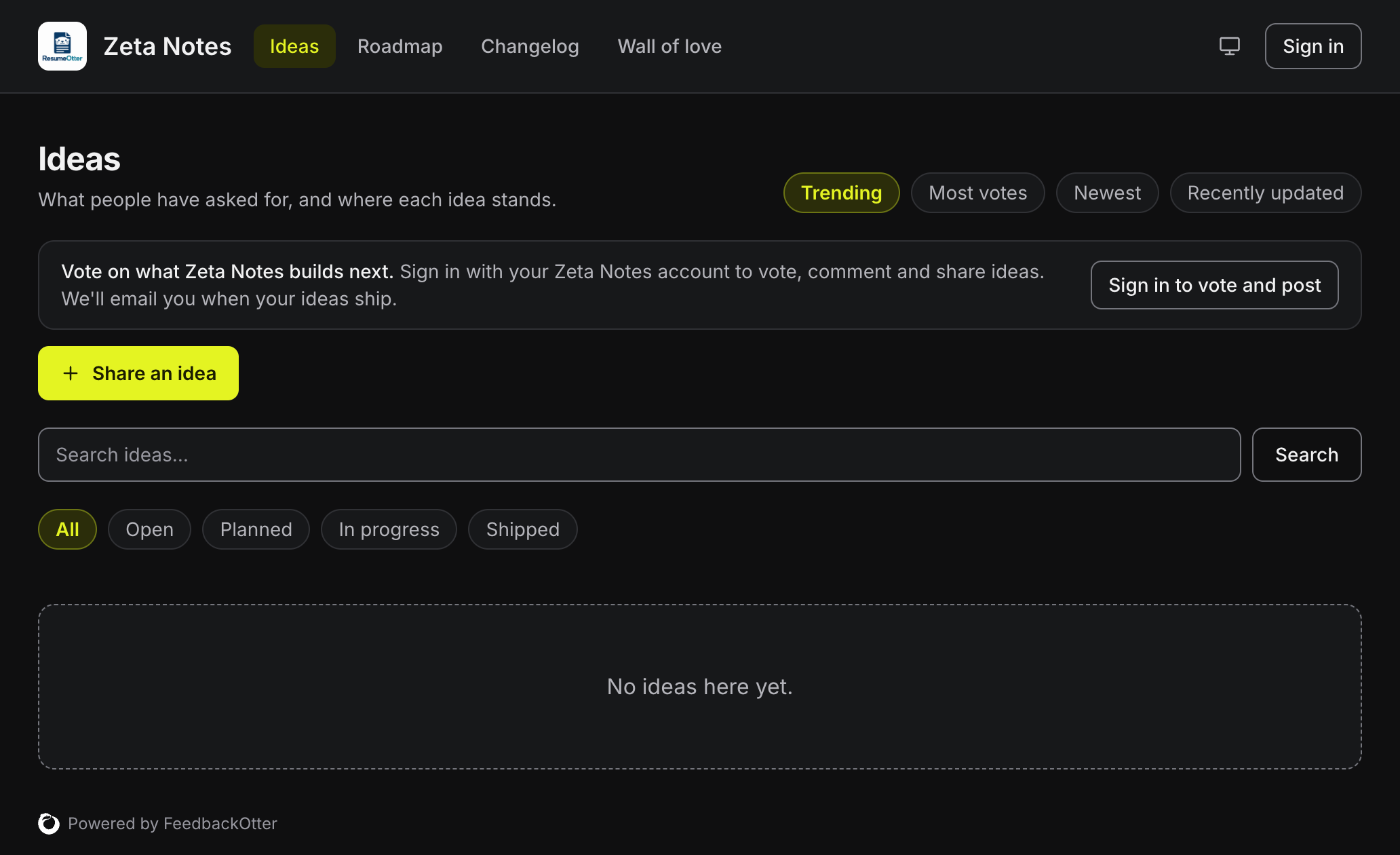
- Someone clicks Sign in on your board.
- Your board sends them to your login URL, with
?redirect=/the/page/they/were/on. - Your app makes sure they’re logged in, then signs a token.
- Your app sends them to
https://<your-board>/sso?token=…&redirect=…. - They’re back on the same page, signed in, for 30 days.
Set your login URL
Section titled “Set your login URL”In Settings → Single sign-on, enter your login URL and click Save.

Until you set one, the board has no Sign in button. It tells visitors to use the Feedback button in your app instead.
Write the login endpoint
Section titled “Write the login endpoint”The endpoint checks they’re logged in, signs a token and redirects.
Set FEEDBACKOTTER_BOARD_URL to your board’s address, like https://acme.feedbackotter.app.
If your board has a custom domain, use that instead.
Express:
import express from "express";import jwt from "jsonwebtoken";
const app = express();
app.get("/feedback-login", (req, res) => {  if (!req.user) {    // Log in first, then come back here.    return res.redirect(`/login?next=${encodeURIComponent(req.originalUrl)}`);  }  const token = jwt.sign(    { sub: String(req.user.id), name: req.user.name, email: req.user.email },    process.env.FEEDBACKOTTER_SSO_SECRET,    { algorithm: "HS256", expiresIn: "5m" },  );  const redirect = typeof req.query.redirect === "string" ? req.query.redirect : "/";  res.redirect(    `${process.env.FEEDBACKOTTER_BOARD_URL}/sso?token=${token}&redirect=${encodeURIComponent(redirect)}`,  );});
App Router, in app/feedback-login/route.ts:
import { SignJWT } from "jose";import { redirect } from "next/navigation";import type { NextRequest } from "next/server";import { getCurrentUser } from "@/lib/auth"; // your own auth
export async function GET(request: NextRequest) {  const user = await getCurrentUser();  if (!user) {    const here = request.nextUrl.pathname + request.nextUrl.search;    redirect(`/login?next=${encodeURIComponent(here)}`);  }  const secret = new TextEncoder().encode(process.env.FEEDBACKOTTER_SSO_SECRET);  const token = await new SignJWT({ name: user.name, email: user.email })    .setProtectedHeader({ alg: "HS256" })    .setSubject(String(user.id))    .setExpirationTime("5m")    .sign(secret);  const back = request.nextUrl.searchParams.get("redirect") ?? "/";  redirect(    `${process.env.FEEDBACKOTTER_BOARD_URL}/sso?token=${token}&redirect=${encodeURIComponent(back)}`,  );}
Django:
import osimport timefrom urllib.parse import quote
import jwtfrom django.contrib.auth.decorators import login_requiredfrom django.shortcuts import redirect

@login_required  # sends people to log in first, then back heredef feedback_login(request):    user = request.user    token = jwt.encode(        {            "sub": str(user.pk),            "name": user.get_full_name() or user.get_username(),            "email": user.email,            "exp": int(time.time()) + 300,        },        os.environ["FEEDBACKOTTER_SSO_SECRET"],        algorithm="HS256",    )    back = request.GET.get("redirect", "/")    board = os.environ["FEEDBACKOTTER_BOARD_URL"]    return redirect(f"{board}/sso?token={token}&redirect={quote(back, safe='')}")
Rails:
# config/routes.rb: get "feedback-login", to: "feedback_login#show"class FeedbackLoginController < ApplicationController  before_action :authenticate_user! # Devise, or your own sign-in check
  def show    token = JWT.encode(      {        sub: current_user.id.to_s,        name: current_user.name,        email: current_user.email,        exp: 5.minutes.from_now.to_i      },      ENV.fetch("FEEDBACKOTTER_SSO_SECRET"),      "HS256"    )    back = params[:redirect].presence || "/"    board = ENV.fetch("FEEDBACKOTTER_BOARD_URL")    redirect_to "#{board}/sso?token=#{token}&redirect=#{ERB::Util.url_encode(back)}",      allow_other_host: true  endend
Laravel, in routes/web.php:
use Firebase\JWT\JWT;use Illuminate\Http\Request;
// config/services.php:// 'feedbackotter' => [//     'secret' => env('FEEDBACKOTTER_SSO_SECRET'),//     'board_url' => env('FEEDBACKOTTER_BOARD_URL'),// ],
Route::get('/feedback-login', function (Request $request) {    $user = $request->user();    $token = JWT::encode([        'sub' => (string) $user->id,        'name' => $user->name,        'email' => $user->email,        'exp' => time() + 300,    ], config('services.feedbackotter.secret'), 'HS256');
    return redirect()->away(config('services.feedbackotter.board_url').'/sso?'.http_build_query([        'token' => $token,        'redirect' => $request->query('redirect', '/'),    ]));})->middleware('auth');
Standard library net/http:
func feedbackLogin(w http.ResponseWriter, r *http.Request) {  user := currentUser(r) // your own auth  if user == nil {    http.Redirect(w, r, "/login?next="+url.QueryEscape(r.URL.RequestURI()), http.StatusFound)    return  }  token, err := jwt.NewWithClaims(jwt.SigningMethodHS256, jwt.MapClaims{    "sub":   strconv.Itoa(user.ID),    "name":  user.Name,    "email": user.Email,    "exp":   time.Now().Add(5 * time.Minute).Unix(),  }).SignedString([]byte(os.Getenv("FEEDBACKOTTER_SSO_SECRET")))  if err != nil {    http.Error(w, "could not sign token", http.StatusInternalServerError)    return  }  redirect := r.URL.Query().Get("redirect")  if redirect == "" {    redirect = "/"  }  target := os.Getenv("FEEDBACKOTTER_BOARD_URL") + "/sso?token=" + token +    "&redirect=" + url.QueryEscape(redirect)  http.Redirect(w, r, target, http.StatusFound)}
// http.HandleFunc("/feedback-login", feedbackLogin)
A 5-minute expiry is enough here. The token is used once, straight away.
Once signed in, the board shows their name:

Try it before writing code
Section titled “Try it before writing code”On the Single sign-on tab, click Generate a test token.
- Copy token: paste it as
tokenin your embed code, on a test page. - Open your board as Test user: see your board signed in.
The test token signs you in as “Test user” for one hour. Don’t ship it.
Security checklist
Section titled “Security checklist”- Sign tokens on your server. Never in the browser.
- Keep the secret in an environment variable or secrets manager.
- Only sign a token for a user who is logged in to your app.
- Keep tokens short: 5 minutes for the board, up to an hour for the widget.
- Pass the
redirectvalue through as it is. The board only follows paths on itself. - If the secret leaks, replace it.
Troubleshooting
Section titled “Troubleshooting”When a token is rejected, the board shows why:
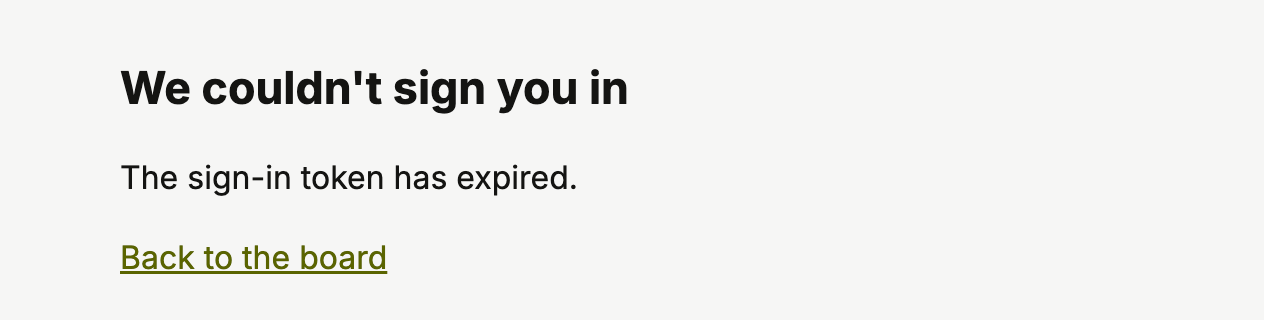
The widget stays read-only and logs the same reason in the browser console:
[FeedbackOtter] The sign-in token was rejected (…); continuing signed out, read-only.| Message | What to check |
|---|---|
| The sign-in token is not a valid HS256 JWT with sub, name and exp. | The algorithm is HS256. sub is a string. name and exp are there. email is a real address. Fields are within their limits. |
| The sign-in token’s signature does not match this board’s secret. | You’re using this product’s secret, and it hasn’t been replaced. No spaces or newlines around it. |
| The sign-in token has expired. | Sign a new token for each page view. Check your server’s clock. |
| The sign-in token’s exp is more than 24 hours away. | exp must be in seconds. Date.now() is in milliseconds: divide by 1000. |
No Sign in button on your board? Set your login URL in Settings → Single sign-on.
Signed in on the board, but not in the widget (or the other way round)?
They’re separate. The widget needs token in the embed code. The board needs the login URL.
Questions
Section titled “Questions”Do I need to create users in FeedbackOtter first? No. A person is created the first time they sign in.
I added someone by hand before they signed in. What happens? Their first sign-in with the same email takes over that record. Votes you added for them stay theirs.
Can a user change their email or name?
Yes. Send the new details in their next token.
sub is what identifies them, so keep it the same.
How do people sign out?
On the board, with Sign out.
In the widget, call FeedbackOtter.identify(null) when they sign out of your app.
I have several products. Do they share a secret? No. Each product has its own secret and login URL.